
B-Tree Index
B-Tree indexes play a crucial role in enhancing database performance by allowing faster retrieval of specific rows. Imagine them as the index pages in a book, providing quick references to relevant data.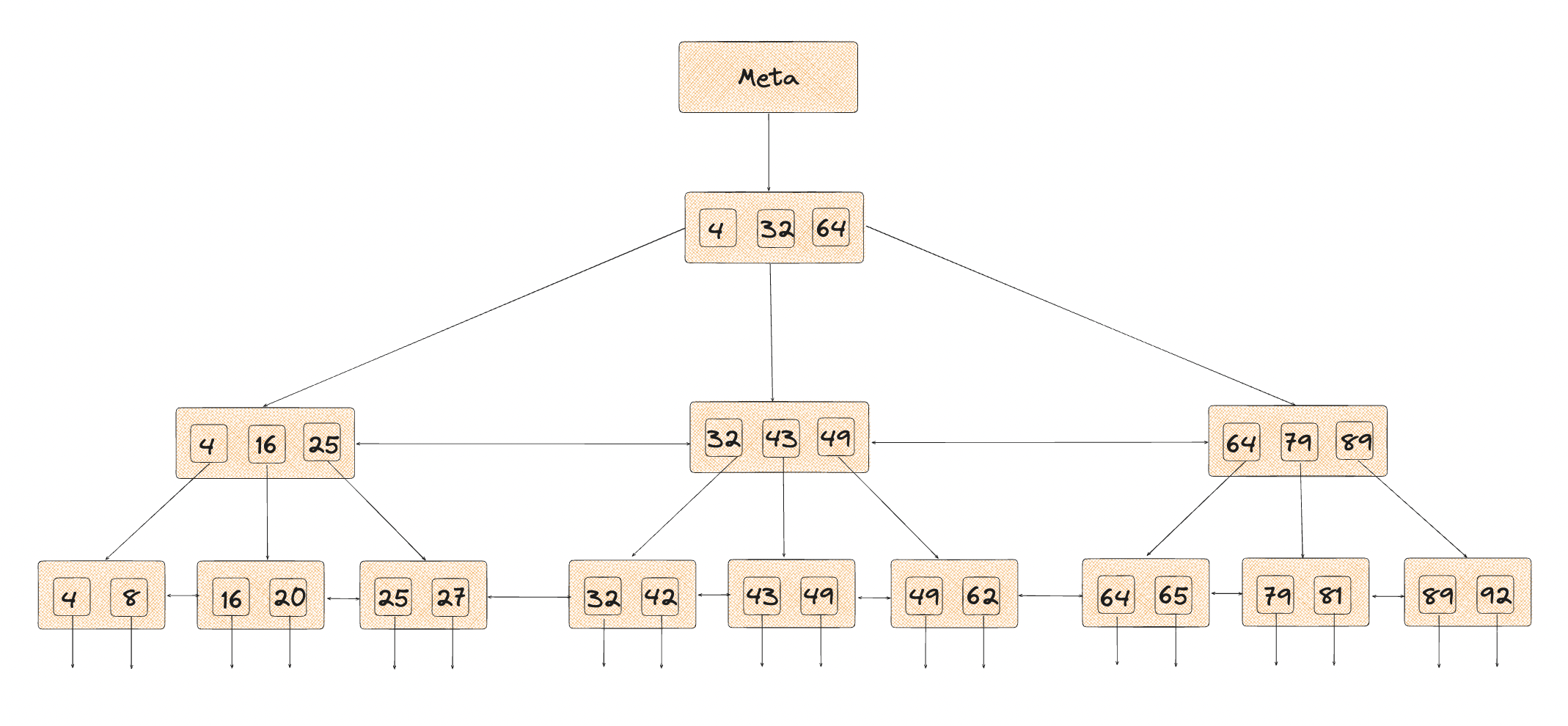
- B-tree indexes are organized as balanced tree structures.
- Each level of the tree acts like a doubly-linked list of pages.
- The index starts with a metapage at the beginning of the first segment file.
- All other pages are either leaf pages (the lowest level) or internal pages.
- B-trees are versatile and widely applicable:
- Equality and Range Queries: They excel in handling equality and range queries. Common operators include
=,<,>,BETWEEN, andIN. - NULL Conditions: B-trees can handle
IS NULLorIS NOT NULLconditions. - Pattern Matching: When anchored to the beginning of a string, they efficiently support pattern matching using
LIKEor~.
- Equality and Range Queries: They excel in handling equality and range queries. Common operators include
employees table and demonstrate B-tree index usage:
Hash Index
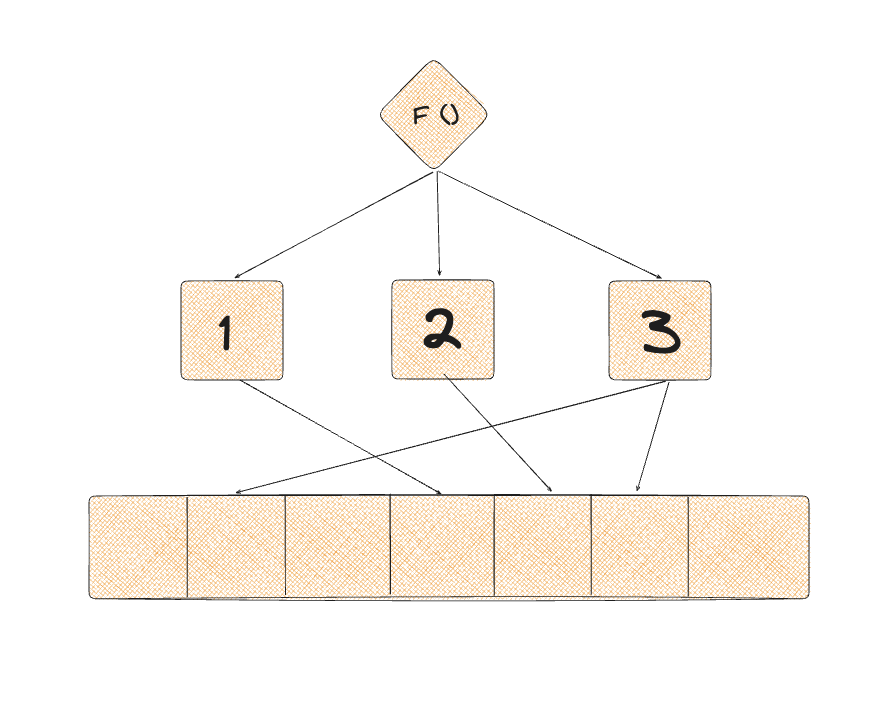
Hash indexes use a hash function to map indexed column values to 32-bit hash codes. These indexes are optimized for simple equality comparisons (using the= operator). Here’s how they work:
- Structure:
- Hash indexes store only the hash value of the data being indexed.
- No restrictions on the size of the indexed column.
- Support only single-column indexes.
- Do not allow uniqueness checking.
- Use Cases:
- Ideal for scenarios where exact matches are common.
- Not suitable for range queries or pattern matching.
- Performance Considerations:
- Fast for equality lookups.
- Minimal overhead during data insertion.
- Not automatically maintained (unlike B-tree indexes).
Example: Employees Table
Let’s create an exampleemployees table and demonstrate Hash index usage:
GiST Index
GiST indexes are a versatile type of index that can handle complex data types, such as geometric shapes, full-text search, and network addresses. They are implemented using a custom data structure optimized for searching large amounts of data1. Here are some key points:- Purpose: GiST indexes are designed to support various query types, including equality queries, range queries, and partial match queries.
- Infrastructure: GiST provides an infrastructure within which different indexing strategies can be implemented.
- Operator Classes: The operators used with GiST indexes depend on the specific indexing strategy (operator class) chosen2.
Examples of GiST Indexes
Let’s explore some examples using tables related to employees. We’ll create a sample table, insert data, and demonstrate how GiST indexes work.Example 1: Geometric Shapes
Suppose we have anemployees table with a location column representing the employees’ office locations (stored as geometric points). We want to efficiently query employees based on their proximity to a specific location.
-
Table Creation:
-
Insert Data:
-
Create GiST Index:
-
Query Using Index:
This query retrieves employees within 1 unit of distance from the point (2, 3).
Performance Considerations
- GiST indexes are powerful but may have higher insertion and maintenance costs compared to B-tree indexes.
- Choose the appropriate operator class and indexing strategy based on your data type and query requirements.
SP-GiST
SP-GiST (Spatial Generalized Search Tree) indexes are a versatile index type offered by PostgreSQL. They are designed for complex, non-rectangular data types and work especially well with geometrical and network-based data. Here are some key points:- Infrastructure: SP-GiST indexes support various kinds of searches, similar to GiST indexes. They permit the implementation of a wide range of different non-balanced disk-based data structures, such as quadtrees, k-d trees, and radix trees (tries) 1.
- Use Cases:
- Geometric Searches: SP-GiST is ideal for spatial data, such as points, lines, and polygons.
- IP Network Searches: When dealing with IP addresses or network ranges.
- Text Search with Complex Pattern Matching: For scenarios where you need to search for patterns within text data 2.
- Performance Considerations:
- SP-GiST indexes are most useful for data that has a natural clustering element and is not an equally balanced tree.
- They work well with data types that don’t fit neatly into rectangular shapes, like GIS (geospatial), multimedia, phone routing, and IP routing data 3.
Example: Employee Table
Let’s create an example employee table and demonstrate how to use SP-GiST indexes.1. Create the Employee Table
2. Insert Sample Data
3. Create an SP-GiST Index on emp_location
4. Query Using the Index
Find Employees Near a Given Point
Output:
emp_nameAlice
Bob
5. Another Example: IP Network Search
Suppose we have an IP address range column:Output:
device_nameRouter A
GIN Index
A GIN index is designed for efficiently handling composite data values, such as arrays or JSON objects. Here are the key points:- What is a GIN Index?
- A GIN index stores a set of
(key, posting list)pairs. - The posting list contains row IDs where the key occurs.
- Multiple posting lists can share the same row ID since an item can have multiple keys.
- Each key value is stored only once, making GIN indexes compact when the same key appears multiple times.
- A GIN index stores a set of
- Use Cases for GIN Indexes:
- GIN indexes are ideal for data values with multiple components, like arrays.
- They efficiently handle queries that search for specific component values within composite items.
- Example 1: Basic Query Using GIN Index
-
Suppose we have an
employeestable with a columnskills(an array of skills). Let’s create anemployeestable: -
Insert some data:
-
To create a GIN index on the
skillscolumn: -
Query using the GIN index:
-
Output:
Alice
-
Example 2: Searching for Multiple Skills
-
Query to find employees with both Java and SQL skills:
-
Output:
Alice
-
Query to find employees with both Java and SQL skills:
-
Example 3: Partial Match
-
Query to find employees with any of the specified skills:
-
Output:
Bob
-
Query to find employees with any of the specified skills:
-
Performance Considerations:
- GIN indexes are efficient for array-based queries but may have overhead during updates.
- Consider the trade-off between query performance and update cost.
- Regularly vacuum the GIN index to maintain performance.
BRIN Index
- BRIN stands for Block Range Index.
- Designed for handling very large tables with columns that have natural correlation to their physical location within the table.
- Works in terms of block ranges (or “page ranges”).
- Each block range groups physically adjacent pages in the table.
- Summary information is stored by the index for each block range.
- Lossy: BRIN indexes can satisfy queries via regular bitmap index scans but are lossy, meaning the query executor rechecks tuples and discards those not matching query conditions.
- Size of block range determined at index creation time by
pages_per_rangestorage parameter.
Use Cases for BRIN Indexes
- Time-Series Data: Ideal for tables with a timestamp column (e.g., sales orders, logs).
- Geospatial Data: Useful for tables with spatial data (e.g., ZIP codes, geographical coordinates).