> ## Documentation Index
> Fetch the complete documentation index at: https://thenile.dev/docs/llms.txt
> Use this file to discover all available pages before exploring further.
# Indexes in Postgres
Indexes in PostgreSQL enhance database performance by allowing faster retrieval of specific rows. They work like an index in a book, providing quick references to relevant data. Here are the main index types:
## B-Tree Index
B-Tree indexes play a crucial role in enhancing database performance by allowing faster retrieval of specific rows. Imagine them as the index pages in a book, providing quick references to relevant data.
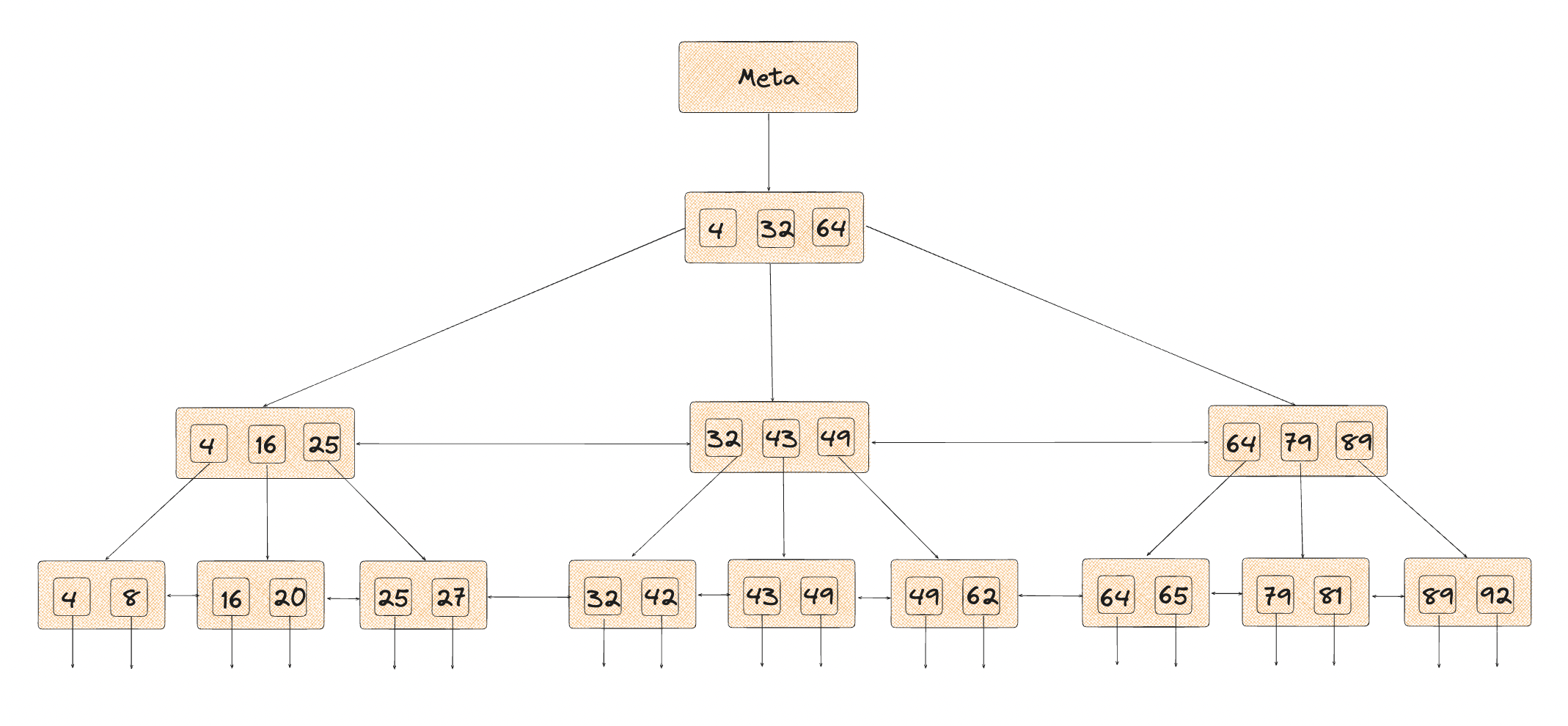 **1. Structure of B-Tree Indexes:**
* B-tree indexes are organized as balanced tree structures.
* Each level of the tree acts like a doubly-linked list of pages.
* The index starts with a metapage at the beginning of the first segment file.
* All other pages are either leaf pages (the lowest level) or internal pages.
**2. Behavior and Use Cases:**
* B-trees are versatile and widely applicable:
* **Equality and Range Queries**: They excel in handling equality and range queries. Common operators include `=`, `<`, `>`, `BETWEEN`, and `IN`.
* **NULL Conditions**: B-trees can handle `IS NULL` or `IS NOT NULL` conditions.
* **Pattern Matching**: When anchored to the beginning of a string, they efficiently support pattern matching using `LIKE` or `~`.
**3. Practical Examples:**
Let's create an example `employees` table and demonstrate B-tree index usage:
```sql theme={null}
CREATE TABLE employees (
emp_id SERIAL PRIMARY KEY,
emp_name VARCHAR(255) NOT NULL,
emp_salary NUMERIC(10, 2) NOT NULL
);
-- Insert some data
INSERT INTO employees (emp_name, emp_salary) VALUES
('Alice', 60000.00),
('Bob', 75000.00),
('Charlie', 90000.00);
-- Create an index on emp_name
CREATE INDEX employees_name ON employees(emp_name);
-- Query using the index
SELECT * FROM employees WHERE emp_name = 'Bob';
```
The output will be:
```
emp_id | emp_name | emp_salary
--------+----------+------------
2 | Bob | 75000.00
```
## Hash Index
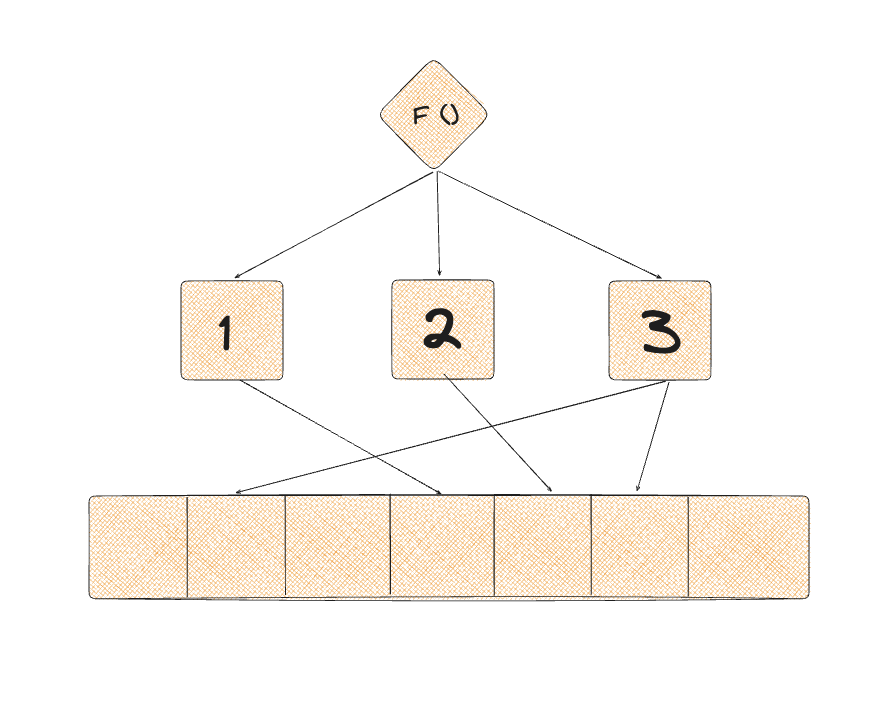
Hash indexes use a hash function to map indexed column values to 32-bit hash codes. These indexes are optimized for simple equality comparisons (using the `=` operator). Here's how they work:
**1. Structure of B-Tree Indexes:**
* B-tree indexes are organized as balanced tree structures.
* Each level of the tree acts like a doubly-linked list of pages.
* The index starts with a metapage at the beginning of the first segment file.
* All other pages are either leaf pages (the lowest level) or internal pages.
**2. Behavior and Use Cases:**
* B-trees are versatile and widely applicable:
* **Equality and Range Queries**: They excel in handling equality and range queries. Common operators include `=`, `<`, `>`, `BETWEEN`, and `IN`.
* **NULL Conditions**: B-trees can handle `IS NULL` or `IS NOT NULL` conditions.
* **Pattern Matching**: When anchored to the beginning of a string, they efficiently support pattern matching using `LIKE` or `~`.
**3. Practical Examples:**
Let's create an example `employees` table and demonstrate B-tree index usage:
```sql theme={null}
CREATE TABLE employees (
emp_id SERIAL PRIMARY KEY,
emp_name VARCHAR(255) NOT NULL,
emp_salary NUMERIC(10, 2) NOT NULL
);
-- Insert some data
INSERT INTO employees (emp_name, emp_salary) VALUES
('Alice', 60000.00),
('Bob', 75000.00),
('Charlie', 90000.00);
-- Create an index on emp_name
CREATE INDEX employees_name ON employees(emp_name);
-- Query using the index
SELECT * FROM employees WHERE emp_name = 'Bob';
```
The output will be:
```
emp_id | emp_name | emp_salary
--------+----------+------------
2 | Bob | 75000.00
```
## Hash Index
Hash indexes use a hash function to map indexed column values to 32-bit hash codes. These indexes are optimized for simple equality comparisons (using the `=` operator). Here's how they work:
 1. **Structure**:
* Hash indexes store only the hash value of the data being indexed.
* No restrictions on the size of the indexed column.
* Support only single-column indexes.
* Do not allow uniqueness checking.
2. **Use Cases**:
* Ideal for scenarios where exact matches are common.
* Not suitable for range queries or pattern matching.
3. **Performance Considerations**:
* Fast for equality lookups.
* Minimal overhead during data insertion.
* Not automatically maintained (unlike B-tree indexes).
## Example: Employees Table
Let's create an example `employees` table and demonstrate Hash index usage:
```sql theme={null}
CREATE TABLE employees (
emp_id SERIAL PRIMARY KEY,
emp_name VARCHAR(255) NOT NULL,
emp_salary NUMERIC(10, 2) NOT NULL
);
-- Insert some data
INSERT INTO employees (emp_name, emp_salary) VALUES
('Alice', 60000.00),
('Bob', 75000.00),
('Charlie', 90000.00);
-- Create a Hash index on emp_name
CREATE INDEX employees_name_hash ON employees USING HASH (emp_name);
-- Query using the index
SELECT * FROM employees WHERE emp_name = 'Bob';
```
Output:
```
emp_id | emp_name | emp_salary
--------+----------+------------
2 | Bob | 75000.00
```
## GiST Index
GiST indexes are a versatile type of index that can handle complex data types, such as geometric shapes, full-text search, and network addresses. [They are implemented using a custom data structure optimized for searching large amounts of data1](https://www.postgresql.org/docs/current/gist.html). Here are some key points:
* **Purpose**: GiST indexes are designed to support various query types, including equality queries, range queries, and partial match queries.
* **Infrastructure**: GiST provides an infrastructure within which different indexing strategies can be implemented.
* [**Operator Classes**: The operators used with GiST indexes depend on the specific indexing strategy (operator class) chosen2](https://www.postgresql.org/docs/current/indexes-types.html).
## Examples of GiST Indexes
Let's explore some examples using tables related to employees. We'll create a sample table, insert data, and demonstrate how GiST indexes work.
### Example 1: Geometric Shapes
Suppose we have an `employees` table with a `location` column representing the employees' office locations (stored as geometric points). We want to efficiently query employees based on their proximity to a specific location.
1. **Table Creation**:
```sql theme={null}
CREATE TABLE employees (
id SERIAL PRIMARY KEY,
name VARCHAR(100),
location POINT
);
```
2. **Insert Data**:
```sql theme={null}
INSERT INTO employees (name, location)
VALUES
('Alice', POINT(1, 2)),
('Bob', POINT(3, 4)),
-- ... (more data)
;
```
3. **Create GiST Index**:
```sql theme={null}
CREATE INDEX idx_location ON employees USING GIST (location);
```
4. **Query Using Index**:
```sql theme={null}
SELECT name
FROM employees
WHERE location <-> POINT(2, 3) < 1;
```
This query retrieves employees within 1 unit of distance from the point (2, 3).
## Performance Considerations
* GiST indexes are powerful but may have higher insertion and maintenance costs compared to B-tree indexes.
* Choose the appropriate operator class and indexing strategy based on your data type and query requirements.
## SP-GiST
SP-GiST (Spatial Generalized Search Tree) indexes are a versatile index type offered by PostgreSQL. They are designed for complex, non-rectangular data types and work especially well with geometrical and network-based data. Here are some key points:
1. **Infrastructure**: SP-GiST indexes support various kinds of searches, similar to GiST indexes. [They permit the implementation of a wide range of different non-balanced disk-based data structures, such as quadtrees, k-d trees, and radix trees (tries) 1](https://www.postgresql.org/docs/current/spgist.html).
2. **Use Cases**:
* **Geometric Searches**: SP-GiST is ideal for spatial data, such as points, lines, and polygons.
* **IP Network Searches**: When dealing with IP addresses or network ranges.
* [**Text Search with Complex Pattern Matching**: For scenarios where you need to search for patterns within text data](https://www.postgresql.org/docs/current/spgist.html) [2](https://roadmap.sh/postgresql-dba/sql-optimization-techniques/indexes-usecases/sp-gist).
3. **Performance Considerations**:
* SP-GiST indexes are most useful for data that has a natural clustering element and is not an equally balanced tree.
* [They work well with data types that don't fit neatly into rectangular shapes, like GIS (geospatial), multimedia, phone routing, and IP routing data 3](https://www.postgresqltutorial.com/postgresql-indexes/postgresql-index-types/).
## Example: Employee Table
Let's create an example employee table and demonstrate how to use SP-GiST indexes.
### 1. Create the Employee Table
```sql theme={null}
CREATE TABLE employees (
emp_id SERIAL PRIMARY KEY,
emp_name VARCHAR(100),
emp_location POINT
);
```
### 2. Insert Sample Data
```sql theme={null}
INSERT INTO employees (emp_name, emp_location)
VALUES
('Alice', POINT(10, 20)),
('Bob', POINT(15, 25)),
('Charlie', POINT(30, 40));
```
### 3. Create an SP-GiST Index on `emp_location`
```sql theme={null}
CREATE INDEX idx_emp_location ON employees USING spgist(emp_location);
```
### 4. Query Using the Index
### Find Employees Near a Given Point
```sql theme={null}
SELECT emp_name
FROM employees
WHERE emp_location <-> POINT(12, 22) < 5;
```
This query finds employees whose location is within 5 units of the point (12, 22).
### Output:
emp\_name
***
Alice
***
Bob
***
### 5. Another Example: IP Network Search
Suppose we have an IP address range column:
```sql theme={null}
CREATE TABLE network_devices (
device_id SERIAL PRIMARY KEY,
device_name VARCHAR(100),
ip_range inet
);
INSERT INTO network_devices (device_name, ip_range)
VALUES
('Router A', '192.168.1.0/24'),
('Switch B', '10.0.0.0/16'),
('Firewall C', '172.16.0.0/20');
CREATE INDEX idx_ip_range ON network_devices USING spgist (ip_range);
```
```sql theme={null}
SELECT device_name
FROM network_devices
WHERE ip_range >> '192.168.1.42';
```
This query finds devices whose IP range includes the address '192.168.1.42'.
### Output:
device\_name
***
Router A
## GIN Index
A GIN index is designed for efficiently handling composite data values, such as arrays or JSON objects. Here are the key points:
1. **What is a GIN Index?**
* A GIN index stores a set of `(key, posting list)` pairs.
* The posting list contains row IDs where the key occurs.
* Multiple posting lists can share the same row ID since an item can have multiple keys.
* [Each key value is stored only once, making GIN indexes compact when the same key appears multiple times](https://www.postgresql.org/docs/current/gin-intro.html).
2. **Use Cases for GIN Indexes:**
* GIN indexes are ideal for data values with multiple components, like arrays.
* [They efficiently handle queries that search for specific component values within composite items](https://www.postgresql.org/docs/current/gin-intro.html).
3. **Example 1: Basic Query Using GIN Index**
* Suppose we have an `employees` table with a column `skills` (an array of skills). Let's create an `employees` table:
```sql theme={null}
CREATE TABLE employees (
id SERIAL PRIMARY KEY,
name VARCHAR(100),
skills TEXT[] -- Array of skills
);
```
* Insert some data:
```sql theme={null}
INSERT INTO employees (name, skills)
VALUES
('Alice', ARRAY['Java', 'SQL']),
('Bob', ARRAY['Python', 'JavaScript']);
```
* To create a GIN index on the `skills` column:
```sql theme={null}
CREATE INDEX idx_gin_skills ON employees USING gin(skills);
```
* Query using the GIN index:
```sql theme={null}
SELECT name FROM employees WHERE skills @> ARRAY['Java'];
```
* Output: `Alice`
1. **Example 2: Searching for Multiple Skills**
* Query to find employees with both Java and SQL skills:
```sql theme={null}
SELECT name FROM employees WHERE skills @> ARRAY['Java', 'SQL'];
```
* Output: `Alice`
2. **Example 3: Partial Match**
* Query to find employees with any of the specified skills:
```sql theme={null}
SELECT name FROM employees WHERE skills && ARRAY['Python', 'JavaScript'];
```
* Output: `Bob`
3. **Performance Considerations:**
* GIN indexes are efficient for array-based queries but may have overhead during updates.
* Consider the trade-off between query performance and update cost.
* Regularly vacuum the GIN index to maintain performance.
## BRIN Index
* **BRIN** stands for **Block Range Index**.
* Designed for handling very large tables with columns that have natural correlation to their physical location within the table.
* Works in terms of **block ranges** (or "page ranges").
* Each block range groups physically adjacent pages in the table.
* Summary information is stored by the index for each block range.
* **Lossy**: BRIN indexes can satisfy queries via regular bitmap index scans but are lossy, meaning the query executor rechecks tuples and discards those not matching query conditions.
* Size of block range determined at index creation time by `pages_per_range` storage parameter.
## Use Cases for BRIN Indexes
1. **Time-Series Data**: Ideal for tables with a timestamp column (e.g., sales orders, logs).
2. **Geospatial Data**: Useful for tables with spatial data (e.g., ZIP codes, geographical coordinates).
## Example: Employee Table
Let's create an employee table and demonstrate BRIN index usage.
### 1. Create Employee Table
```sql theme={null}
CREATE TABLE employees (
emp_id SERIAL PRIMARY KEY,
emp_name VARCHAR(100),
hire_date DATE
);
```
### 2. Insert Sample Data
```sql theme={null}
INSERT INTO employees (emp_name, hire_date)
VALUES
('Alice', '2022-01-15'),
('Bob', '2021-03-10'),
('Charlie', '2020-11-20');
```
### 3. Create BRIN Index on `hire_date`
```sql theme={null}
CREATE INDEX idx_employees_hire_date_brin
ON employees USING brin (hire_date);
```
### 4. Query Using BRIN Index
```sql theme={null}
-- Find employees hired after 2021-01-01
SELECT emp_name
FROM employees
WHERE hire_date >= '2021-01-01';
```
### Output
```
emp_name
----------
Alice
Bob
(2 rows)
```
Remember that BRIN indexes are most effective when dealing with large tables and specific column types.
[For more details, refer to the official PostgreSQL documentation.](https://www.postgresql.org/docs/current/indexes.html)
1. **Structure**:
* Hash indexes store only the hash value of the data being indexed.
* No restrictions on the size of the indexed column.
* Support only single-column indexes.
* Do not allow uniqueness checking.
2. **Use Cases**:
* Ideal for scenarios where exact matches are common.
* Not suitable for range queries or pattern matching.
3. **Performance Considerations**:
* Fast for equality lookups.
* Minimal overhead during data insertion.
* Not automatically maintained (unlike B-tree indexes).
## Example: Employees Table
Let's create an example `employees` table and demonstrate Hash index usage:
```sql theme={null}
CREATE TABLE employees (
emp_id SERIAL PRIMARY KEY,
emp_name VARCHAR(255) NOT NULL,
emp_salary NUMERIC(10, 2) NOT NULL
);
-- Insert some data
INSERT INTO employees (emp_name, emp_salary) VALUES
('Alice', 60000.00),
('Bob', 75000.00),
('Charlie', 90000.00);
-- Create a Hash index on emp_name
CREATE INDEX employees_name_hash ON employees USING HASH (emp_name);
-- Query using the index
SELECT * FROM employees WHERE emp_name = 'Bob';
```
Output:
```
emp_id | emp_name | emp_salary
--------+----------+------------
2 | Bob | 75000.00
```
## GiST Index
GiST indexes are a versatile type of index that can handle complex data types, such as geometric shapes, full-text search, and network addresses. [They are implemented using a custom data structure optimized for searching large amounts of data1](https://www.postgresql.org/docs/current/gist.html). Here are some key points:
* **Purpose**: GiST indexes are designed to support various query types, including equality queries, range queries, and partial match queries.
* **Infrastructure**: GiST provides an infrastructure within which different indexing strategies can be implemented.
* [**Operator Classes**: The operators used with GiST indexes depend on the specific indexing strategy (operator class) chosen2](https://www.postgresql.org/docs/current/indexes-types.html).
## Examples of GiST Indexes
Let's explore some examples using tables related to employees. We'll create a sample table, insert data, and demonstrate how GiST indexes work.
### Example 1: Geometric Shapes
Suppose we have an `employees` table with a `location` column representing the employees' office locations (stored as geometric points). We want to efficiently query employees based on their proximity to a specific location.
1. **Table Creation**:
```sql theme={null}
CREATE TABLE employees (
id SERIAL PRIMARY KEY,
name VARCHAR(100),
location POINT
);
```
2. **Insert Data**:
```sql theme={null}
INSERT INTO employees (name, location)
VALUES
('Alice', POINT(1, 2)),
('Bob', POINT(3, 4)),
-- ... (more data)
;
```
3. **Create GiST Index**:
```sql theme={null}
CREATE INDEX idx_location ON employees USING GIST (location);
```
4. **Query Using Index**:
```sql theme={null}
SELECT name
FROM employees
WHERE location <-> POINT(2, 3) < 1;
```
This query retrieves employees within 1 unit of distance from the point (2, 3).
## Performance Considerations
* GiST indexes are powerful but may have higher insertion and maintenance costs compared to B-tree indexes.
* Choose the appropriate operator class and indexing strategy based on your data type and query requirements.
## SP-GiST
SP-GiST (Spatial Generalized Search Tree) indexes are a versatile index type offered by PostgreSQL. They are designed for complex, non-rectangular data types and work especially well with geometrical and network-based data. Here are some key points:
1. **Infrastructure**: SP-GiST indexes support various kinds of searches, similar to GiST indexes. [They permit the implementation of a wide range of different non-balanced disk-based data structures, such as quadtrees, k-d trees, and radix trees (tries) 1](https://www.postgresql.org/docs/current/spgist.html).
2. **Use Cases**:
* **Geometric Searches**: SP-GiST is ideal for spatial data, such as points, lines, and polygons.
* **IP Network Searches**: When dealing with IP addresses or network ranges.
* [**Text Search with Complex Pattern Matching**: For scenarios where you need to search for patterns within text data](https://www.postgresql.org/docs/current/spgist.html) [2](https://roadmap.sh/postgresql-dba/sql-optimization-techniques/indexes-usecases/sp-gist).
3. **Performance Considerations**:
* SP-GiST indexes are most useful for data that has a natural clustering element and is not an equally balanced tree.
* [They work well with data types that don't fit neatly into rectangular shapes, like GIS (geospatial), multimedia, phone routing, and IP routing data 3](https://www.postgresqltutorial.com/postgresql-indexes/postgresql-index-types/).
## Example: Employee Table
Let's create an example employee table and demonstrate how to use SP-GiST indexes.
### 1. Create the Employee Table
```sql theme={null}
CREATE TABLE employees (
emp_id SERIAL PRIMARY KEY,
emp_name VARCHAR(100),
emp_location POINT
);
```
### 2. Insert Sample Data
```sql theme={null}
INSERT INTO employees (emp_name, emp_location)
VALUES
('Alice', POINT(10, 20)),
('Bob', POINT(15, 25)),
('Charlie', POINT(30, 40));
```
### 3. Create an SP-GiST Index on `emp_location`
```sql theme={null}
CREATE INDEX idx_emp_location ON employees USING spgist(emp_location);
```
### 4. Query Using the Index
### Find Employees Near a Given Point
```sql theme={null}
SELECT emp_name
FROM employees
WHERE emp_location <-> POINT(12, 22) < 5;
```
This query finds employees whose location is within 5 units of the point (12, 22).
### Output:
emp\_name
***
Alice
***
Bob
***
### 5. Another Example: IP Network Search
Suppose we have an IP address range column:
```sql theme={null}
CREATE TABLE network_devices (
device_id SERIAL PRIMARY KEY,
device_name VARCHAR(100),
ip_range inet
);
INSERT INTO network_devices (device_name, ip_range)
VALUES
('Router A', '192.168.1.0/24'),
('Switch B', '10.0.0.0/16'),
('Firewall C', '172.16.0.0/20');
CREATE INDEX idx_ip_range ON network_devices USING spgist (ip_range);
```
```sql theme={null}
SELECT device_name
FROM network_devices
WHERE ip_range >> '192.168.1.42';
```
This query finds devices whose IP range includes the address '192.168.1.42'.
### Output:
device\_name
***
Router A
## GIN Index
A GIN index is designed for efficiently handling composite data values, such as arrays or JSON objects. Here are the key points:
1. **What is a GIN Index?**
* A GIN index stores a set of `(key, posting list)` pairs.
* The posting list contains row IDs where the key occurs.
* Multiple posting lists can share the same row ID since an item can have multiple keys.
* [Each key value is stored only once, making GIN indexes compact when the same key appears multiple times](https://www.postgresql.org/docs/current/gin-intro.html).
2. **Use Cases for GIN Indexes:**
* GIN indexes are ideal for data values with multiple components, like arrays.
* [They efficiently handle queries that search for specific component values within composite items](https://www.postgresql.org/docs/current/gin-intro.html).
3. **Example 1: Basic Query Using GIN Index**
* Suppose we have an `employees` table with a column `skills` (an array of skills). Let's create an `employees` table:
```sql theme={null}
CREATE TABLE employees (
id SERIAL PRIMARY KEY,
name VARCHAR(100),
skills TEXT[] -- Array of skills
);
```
* Insert some data:
```sql theme={null}
INSERT INTO employees (name, skills)
VALUES
('Alice', ARRAY['Java', 'SQL']),
('Bob', ARRAY['Python', 'JavaScript']);
```
* To create a GIN index on the `skills` column:
```sql theme={null}
CREATE INDEX idx_gin_skills ON employees USING gin(skills);
```
* Query using the GIN index:
```sql theme={null}
SELECT name FROM employees WHERE skills @> ARRAY['Java'];
```
* Output: `Alice`
1. **Example 2: Searching for Multiple Skills**
* Query to find employees with both Java and SQL skills:
```sql theme={null}
SELECT name FROM employees WHERE skills @> ARRAY['Java', 'SQL'];
```
* Output: `Alice`
2. **Example 3: Partial Match**
* Query to find employees with any of the specified skills:
```sql theme={null}
SELECT name FROM employees WHERE skills && ARRAY['Python', 'JavaScript'];
```
* Output: `Bob`
3. **Performance Considerations:**
* GIN indexes are efficient for array-based queries but may have overhead during updates.
* Consider the trade-off between query performance and update cost.
* Regularly vacuum the GIN index to maintain performance.
## BRIN Index
* **BRIN** stands for **Block Range Index**.
* Designed for handling very large tables with columns that have natural correlation to their physical location within the table.
* Works in terms of **block ranges** (or "page ranges").
* Each block range groups physically adjacent pages in the table.
* Summary information is stored by the index for each block range.
* **Lossy**: BRIN indexes can satisfy queries via regular bitmap index scans but are lossy, meaning the query executor rechecks tuples and discards those not matching query conditions.
* Size of block range determined at index creation time by `pages_per_range` storage parameter.
## Use Cases for BRIN Indexes
1. **Time-Series Data**: Ideal for tables with a timestamp column (e.g., sales orders, logs).
2. **Geospatial Data**: Useful for tables with spatial data (e.g., ZIP codes, geographical coordinates).
## Example: Employee Table
Let's create an employee table and demonstrate BRIN index usage.
### 1. Create Employee Table
```sql theme={null}
CREATE TABLE employees (
emp_id SERIAL PRIMARY KEY,
emp_name VARCHAR(100),
hire_date DATE
);
```
### 2. Insert Sample Data
```sql theme={null}
INSERT INTO employees (emp_name, hire_date)
VALUES
('Alice', '2022-01-15'),
('Bob', '2021-03-10'),
('Charlie', '2020-11-20');
```
### 3. Create BRIN Index on `hire_date`
```sql theme={null}
CREATE INDEX idx_employees_hire_date_brin
ON employees USING brin (hire_date);
```
### 4. Query Using BRIN Index
```sql theme={null}
-- Find employees hired after 2021-01-01
SELECT emp_name
FROM employees
WHERE hire_date >= '2021-01-01';
```
### Output
```
emp_name
----------
Alice
Bob
(2 rows)
```
Remember that BRIN indexes are most effective when dealing with large tables and specific column types.
[For more details, refer to the official PostgreSQL documentation.](https://www.postgresql.org/docs/current/indexes.html)