> ## Documentation Index
> Fetch the complete documentation index at: https://thenile.dev/docs/llms.txt
> Use this file to discover all available pages before exploring further.
# Using Authentication
The `nile auth` commands help you set up and manage authentication in your applications. These commands streamline the process of adding multi-tenant authentication to your projects and managing authentication-related configurations.
## Overview
```bash theme={null}
nile auth quickstart --nextjs # Add Multi-tenant Authentication in 2 minutes
nile auth env # Generate environment variables
nile auth env --output .env.local # Save environment variables to a file
```
## Quick Start Guide
The quickstart command helps you create a new application with Nile authentication pre-configured. Currently supports Next.js applications.
### Creating a Next.js Application with Authentication
```bash theme={null}
nile auth quickstart --nextjs
```
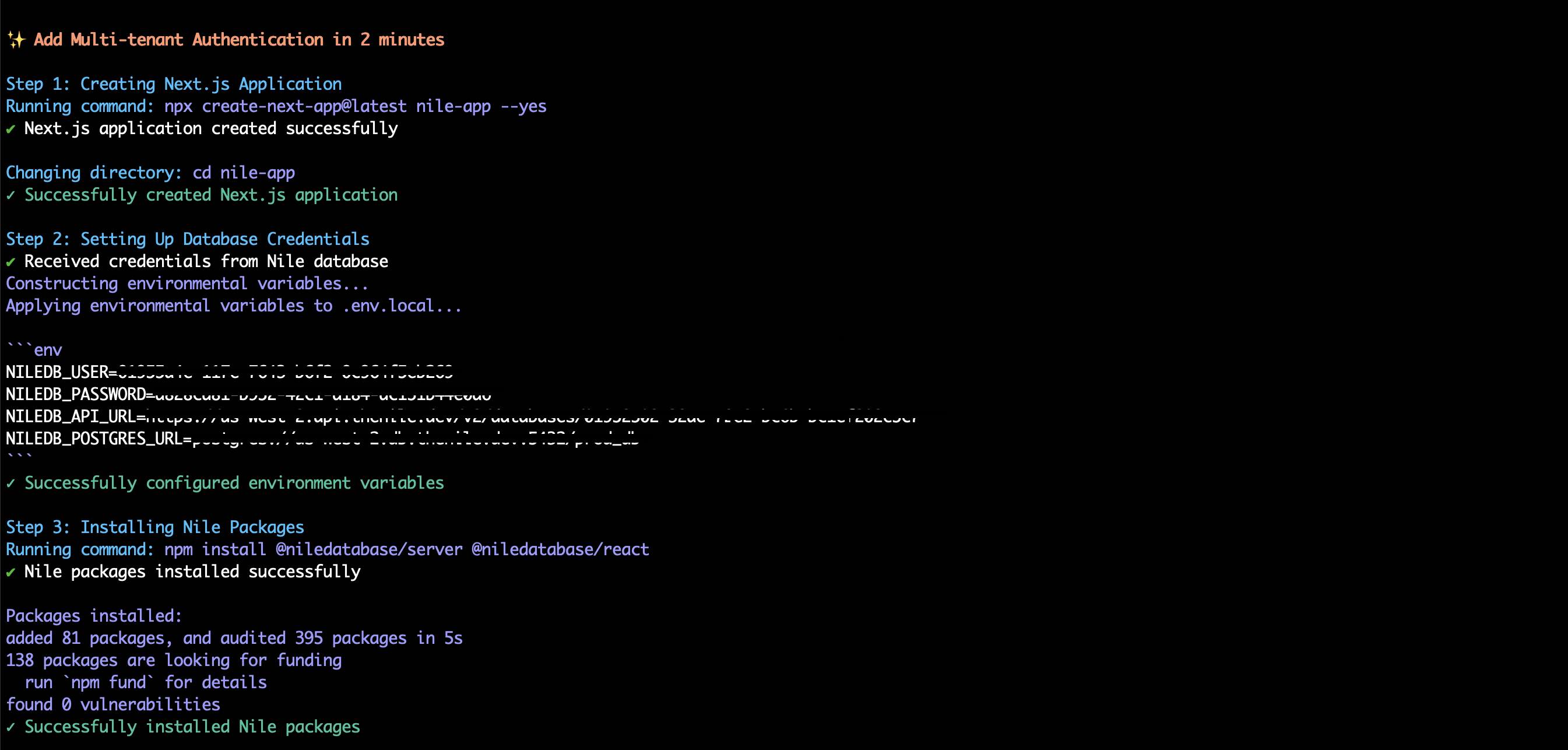
This command will:
1. Create a new Next.js application
2. Set up database credentials
3. Install required Nile packages
4. Configure API routes
5. Add authentication components
6. Start the development server
 ### What Gets Created
The quickstart command sets up the following structure:
```
nile-app/
├── .env.local # Environment variables
├── app/
│ ├── page.tsx # Main page with auth components
│ └── api/
│ └── [...nile]/ # Nile API routes
│ ├── nile.ts # Nile configuration
│ └── route.ts # API route handlers
└── package.json # Project dependencies
```
#### Authentication Components
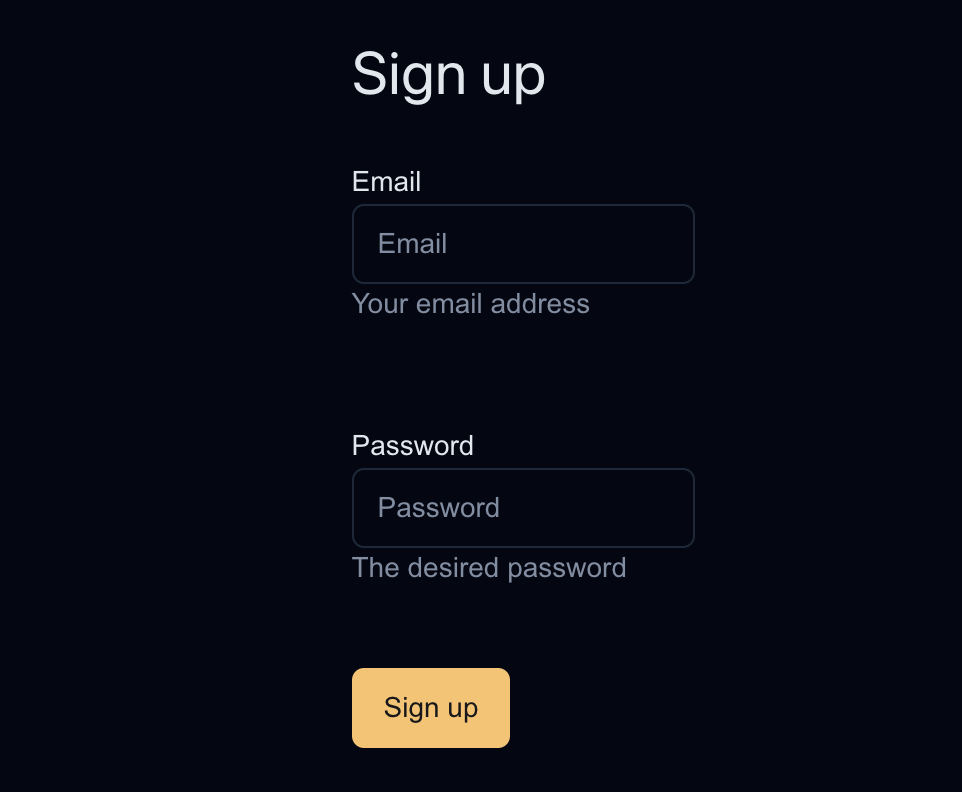
The command sets up a basic authentication page with:
```tsx theme={null}
import {
SignOutButton,
SignUpForm,
SignedIn,
SignedOut,
UserInfo,
} from '@niledatabase/react';
import '@niledatabase/react/styles.css';
export default function SignUpPage() {
return (
### What Gets Created
The quickstart command sets up the following structure:
```
nile-app/
├── .env.local # Environment variables
├── app/
│ ├── page.tsx # Main page with auth components
│ └── api/
│ └── [...nile]/ # Nile API routes
│ ├── nile.ts # Nile configuration
│ └── route.ts # API route handlers
└── package.json # Project dependencies
```
#### Authentication Components
The command sets up a basic authentication page with:
```tsx theme={null}
import {
SignOutButton,
SignUpForm,
SignedIn,
SignedOut,
UserInfo,
} from '@niledatabase/react';
import '@niledatabase/react/styles.css';
export default function SignUpPage() {
return (
);
}
```
 ## Environment Variables
The `env` command helps you generate and manage authentication-related environment variables.
### Generating Environment Variables
```bash theme={null}
# Display variables in terminal
nile auth env
# Save variables to a file
nile auth env --output .env.local
```
### Generated Variables
The command creates the following environment variables:
```env theme={null}
NILEDB_USER=your_database_user
NILEDB_PASSWORD=your_database_password
NILEDB_API_URL=https://us-west-2.api.thenile.dev/v2/databases/your_database_id
NILEDB_POSTGRES_URL=postgres://us-west-2.db.thenile.dev:5432/your_database
```
## Best Practices
1. **Environment Variables**
* Always use `--output` flag to save variables to `.env.local`
* Add `.env.local` to your `.gitignore`
* Never commit sensitive credentials to version control
2. **Authentication Components**
* Customize the authentication UI to match your application's design
* Add additional fields to the sign-up form as needed
* Implement proper error handling
3. **Security**
* Keep your database credentials secure
* Regularly rotate credentials using `nile auth env`
* Use environment variables for all sensitive information
## Troubleshooting
### Common Issues
1. **Quickstart Command Fails**
```bash theme={null}
# Ensure you're connected to Nile
nile connect login
# Verify workspace and database are set
nile config
```
2. **Environment Variables Not Working**
```bash theme={null}
# Regenerate environment variables
nile auth env --output .env.local
# Restart your development server
npm run dev
```
3. **Authentication Components Not Showing**
```bash theme={null}
# Ensure Nile packages are installed
npm install @niledatabase/server @niledatabase/react @niledatabase/client
# Check API routes are properly configured
ls app/api/[...nile]/
```
## Related Commands
* `nile connect login` - Connect to Nile using browser-based authentication
* `nile local start` - Start local development environment
* `nile config` - Configure workspace and database settings
## Examples
### Basic Authentication Setup
```bash theme={null}
# Create new Next.js app with authentication
nile auth quickstart --nextjs
# Generate environment variables
nile auth env --output .env.local
# Start the development server
cd nile-app
npm run dev
```
### Custom Authentication Flow
1. Create a new Next.js app manually
```bash theme={null}
npx create-next-app@latest my-app
cd my-app
```
2. Install Nile packages
```bash theme={null}
npm install @niledatabase/server @niledatabase/react @niledatabase/client
```
3. Generate environment variables
```bash theme={null}
nile auth env --output .env.local
```
4. Set up API routes and components manually
```bash theme={null}
mkdir -p app/api/[...nile]
# Add nile.ts and route.ts files
# Customize authentication components
```
## API Reference
### `nile auth quickstart`
Options:
* `--nextjs` - Create a Next.js application (required)
### `nile auth env`
Options:
* `--output ` - Save variables to a file (optional)
## Further Reading
* [Nile Authentication Documentation](https://thenile.dev/docs/authentication)
* [Next.js Integration Guide](https://thenile.dev/docs/integrations/nextjs)
* [Custom Authentication Flows](https://thenile.dev/docs/authentication/custom)
```
```
## Environment Variables
The `env` command helps you generate and manage authentication-related environment variables.
### Generating Environment Variables
```bash theme={null}
# Display variables in terminal
nile auth env
# Save variables to a file
nile auth env --output .env.local
```
### Generated Variables
The command creates the following environment variables:
```env theme={null}
NILEDB_USER=your_database_user
NILEDB_PASSWORD=your_database_password
NILEDB_API_URL=https://us-west-2.api.thenile.dev/v2/databases/your_database_id
NILEDB_POSTGRES_URL=postgres://us-west-2.db.thenile.dev:5432/your_database
```
## Best Practices
1. **Environment Variables**
* Always use `--output` flag to save variables to `.env.local`
* Add `.env.local` to your `.gitignore`
* Never commit sensitive credentials to version control
2. **Authentication Components**
* Customize the authentication UI to match your application's design
* Add additional fields to the sign-up form as needed
* Implement proper error handling
3. **Security**
* Keep your database credentials secure
* Regularly rotate credentials using `nile auth env`
* Use environment variables for all sensitive information
## Troubleshooting
### Common Issues
1. **Quickstart Command Fails**
```bash theme={null}
# Ensure you're connected to Nile
nile connect login
# Verify workspace and database are set
nile config
```
2. **Environment Variables Not Working**
```bash theme={null}
# Regenerate environment variables
nile auth env --output .env.local
# Restart your development server
npm run dev
```
3. **Authentication Components Not Showing**
```bash theme={null}
# Ensure Nile packages are installed
npm install @niledatabase/server @niledatabase/react @niledatabase/client
# Check API routes are properly configured
ls app/api/[...nile]/
```
## Related Commands
* `nile connect login` - Connect to Nile using browser-based authentication
* `nile local start` - Start local development environment
* `nile config` - Configure workspace and database settings
## Examples
### Basic Authentication Setup
```bash theme={null}
# Create new Next.js app with authentication
nile auth quickstart --nextjs
# Generate environment variables
nile auth env --output .env.local
# Start the development server
cd nile-app
npm run dev
```
### Custom Authentication Flow
1. Create a new Next.js app manually
```bash theme={null}
npx create-next-app@latest my-app
cd my-app
```
2. Install Nile packages
```bash theme={null}
npm install @niledatabase/server @niledatabase/react @niledatabase/client
```
3. Generate environment variables
```bash theme={null}
nile auth env --output .env.local
```
4. Set up API routes and components manually
```bash theme={null}
mkdir -p app/api/[...nile]
# Add nile.ts and route.ts files
# Customize authentication components
```
## API Reference
### `nile auth quickstart`
Options:
* `--nextjs` - Create a Next.js application (required)
### `nile auth env`
Options:
* `--output ` - Save variables to a file (optional)
## Further Reading
* [Nile Authentication Documentation](https://thenile.dev/docs/authentication)
* [Next.js Integration Guide](https://thenile.dev/docs/integrations/nextjs)
* [Custom Authentication Flows](https://thenile.dev/docs/authentication/custom)
```
```