> ## Documentation Index
> Fetch the complete documentation index at: https://thenile.dev/docs/llms.txt
> Use this file to discover all available pages before exploring further.
# Express.js
> Integrate Nile Auth with Express.js applications
Learn how to integrate Nile Auth with your Express.js application. The integration allows the application to interact with Nile's APIs and databases,
providing tenant-aware data management.
This guide provides an overview of how to use Nile-Auth core functionality with an Express.js application. We'll cover the following topics:
* Authentication, cookies, sessions
* Tenant isolation
* Securing endpoints
It is important to note that the Auth service is designed to work with actions
a **user** would take in the context of your B2B web application.
## Authentication
```bash theme={null}
mkdir express-app
cd express-app
npm init -y
```
```bash theme={null}
npm install @niledatabase/server @niledatabase/express express dotenv --save
```
1. If you haven't signed up for Nile yet, [sign up here](https://console.thenile.dev) and follow the steps to create a database.
2. Navigate to **Database Settings** in your database's UI at [console.thenile.dev](https://console.thenile.dev).
3. Go to **Connection** settings.
4. Select the CLI icon, and click **Generate credentials**
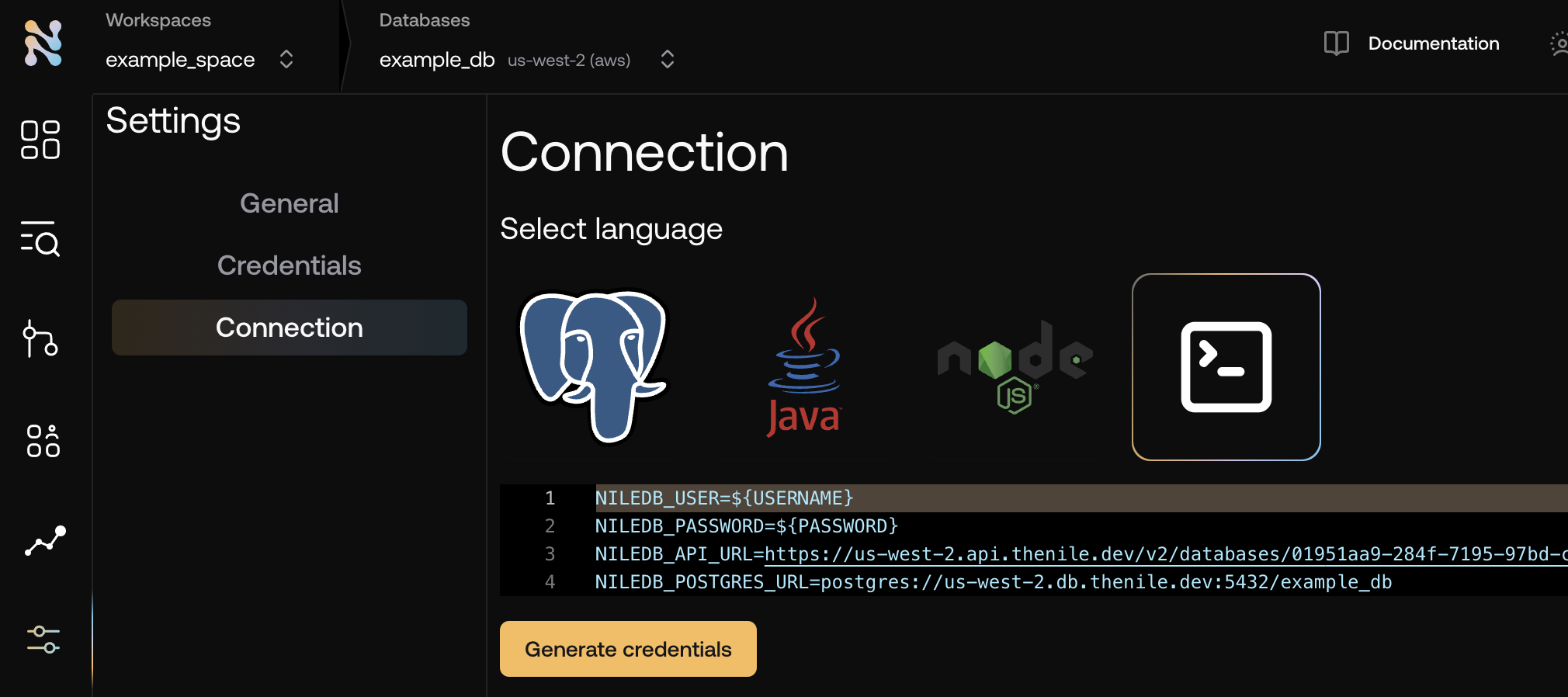 5. **Copy** the required credentials and **store them in an `.env` file** so they can be used in the application to connect to the Nile auth service.
```bash .env theme={null}
NILEDB_USER=niledb_user
NILEDB_PASSWORD=niledb_password
NILEDB_API_URL=https://us-west-2.api.thenile.dev/v2/databases/
NILEDB_POSTGRES_URL=postgres://us-west-2.db.thenile.dev:5432/
```
Create a new file called `server.mjs` and add the following code:
```javascript server.mjs theme={null}
import 'dotenv/config';
import express from 'express';
import { Nile } from '@niledatabase/server';
import { express as nileExpress } from '@niledatabase/express';
const startServer = async () => {
try {
const app = express();
const nile = Nile({
extensions: [nileExpress(app)],
});
app.use(express.json());
app.use(express.urlencoded({ extended: true }));
const PORT = process.env.PORT || 3040;
app.listen(PORT, () => {
console.log(`Server is running on port ${PORT}`);
});
} catch (error) {
console.error('Error starting server:', error);
process.exit(1);
}
};
startServer();
```
```bash theme={null}
node server.mjs
```
Nile auth uses cookies to store session information. To obtain them via cURL, create a file called `get_cookies.sh` and add the following code:
```bash get_cookies.sh theme={null}
#!/bin/bash
# Ensure EMAIL and PASSWORD are provided
if [ $# -lt 2 ]; then
echo "Usage: $0 [API_URL]"
exit 1
fi
EMAIL="$1"
PASSWORD="$2"
API_URL="${3:-http://localhost:3040}" # Default to localhost if not provided
# Define cookie file names
csrf_cookie_file="csrf_cookies.txt"
login_cookie_file="login_cookies.txt"
# Define API endpoints
CSRF_URL="$API_URL/api/auth/csrf"
LOGIN_URL="$API_URL/api/signup"
# Fetch CSRF token and store cookies
csrf_token=$(curl -s -X GET "$CSRF_URL" -c "$csrf_cookie_file" | jq -r '.csrfToken')
# Exit if CSRF token is missing
[ -z "$csrf_token" ] || [ "$csrf_token" == "null" ] && { echo "Failed to retrieve CSRF token"; exit 1; }
# Perform login request using CSRF token and cookies
curl -s -X POST "$LOGIN_URL" \
-H "Content-Type: application/x-www-form-urlencoded" \
-b "$csrf_cookie_file" \
--cookie-jar "$login_cookie_file" \
--data-urlencode "csrfToken=$csrf_token" \
--data-urlencode "email=$EMAIL" \
--data-urlencode "password=$PASSWORD" >/dev/null
# Output login cookie file info
echo "Login successful. Use $login_cookie_file for authenticated requests:"
echo "curl \"$API_URL/api/me\" -b $login_cookie_file"
```
Set the permissions to be executable
```bash theme={null}
chmod +x get_cookies.sh
```
Run the command with the required params
````bash theme={null}
./get_cookies.sh spongebob@squarepants.com no-this-is-patrick
You should see the following output
```bash
# Login successful. Use login_cookies.txt for authenticated requests:
# curl "http://localhost:3040/api/me" -b login_cookies.txt
````
You can then curl the API with the cookies
```bash theme={null}
curl "http://localhost:3040/api/me" -b login_cookies.txt
# You should see the following output
# {"email":"spongebob@squarepants.com","name":"Spongebob Squarepants","tenantId":"0192830912830912"}
```
## Tenant Isolation and Secure Endpoints
Since Nile-Auth is designed to work with B2B applications, it is important to understand how to work with tenants, their access to data,
and how to secure endpoints.
We are going to extend the previous example with new functionality.
We'll add a new table to the database, and a new endpoint that queries the data, making sure the
endpoint is both secure and isolated to the tenant.
You do not need a new endpoint in order to extand your application with tenant functionality. Nile's SDK includes generated routes for managing tenants.
We just need to call them:
```bash theme={null}
curl -X POST 'localhost:3040/api/tenants' \
-H 'Content-Type: application/json' \
-d '{"name":"my first customer"}' \
-b login_cookies.txt
```
There are multiple ways to pass the current tenant to the web app on each request.
You can pass it as a param, a header, or a cookie. In this example we'll pass it as a param.
Add the following code to your `server.mjs` file, just after the `app.use(express.urlencoded({ extended: true }));` line.
This will extract the tenant ID from the request params, and configure the nile client to use it as
the current tenant before handling any request.
`server.mjs`
```javascript theme={null}
app.param('tenantId', (req, res, next, tenantId) => {
nile.withContext({ tenantId });
next();
});
```
In Nile console or another database client of your choice, run the following SQL to create a new table called `todos`
and populate it with some example tasks.
```sql theme={null}
CREATE TABLE IF NOT EXISTS todos (
id uuid DEFAULT (gen_random_uuid()),
tenant_id uuid,
title varchar(256),
estimate varchar(256),
embedding vector(768),
complete boolean
);
insert into tenants (id, name) VALUES
('019637b6-6d72-774b-9796-8c35813f9f78', 'express_test_tenant');
-- Insert sample data. Make sure you replace the tenant_id with the one you created in the previous step.
INSERT INTO todos (tenant_id, title, estimate, complete)
VALUES
('019637b6-6d72-774b-9796-8c35813f9f78', 'Finish Express integration', '2h', false),
('019637b6-6d72-774b-9796-8c35813f9f78', 'Write documentation', '1h', false);
```
Add a route that takes a tenant Id and queries the database. if `app.param` is set
(as we did in the previous step), the query will automatically be [isolated](/tenant-virtualization/tenant-isolation) to the
current tenant. See how it returns data **only**for the tenant we requested even
if there are multiple tenants in the database and even though the query does not include a tenant\_id filter.
Add the following code to your `server.mjs` file, just after the `app.delete(paths.delete, handler);` line:
`server.mjs`
```javascript theme={null}
// Get all tasks for tenant
app.get('/api/tenants/:tenantId/todos', async (req, res) => {
try {
// the nile.tenantId is set in the previous `app.param`
const todos = await nile.query(`SELECT * FROM todos ORDER BY title`);
res.json(todos.rows);
return;
} catch (error) {
console.log('error listing tasks: ' + error.message);
res.status(500).json({ message: 'Internal Server Error' });
return;
}
});
```
The route we created is isolated to a specific tenant, however at this point, any user can call it. It is not secure.
Lets protect it by checking if the user is authenticated. Add the following code to your `server.mjs` file, just after the `app.get("/api/tenants/:tenantId/todos", async (req, res) => {` line:
```javascript theme={null}
const session = await nile.auth.getSession(req);
if (!session?.user) {
res.status(401).json({ message: 'Unauthorized' });
return;
}
```
You can add this logic in a middleware function, so it will be applied to all routes that need to be protected.
If you haven't already, run the server:
```bash theme={null}
node server.mjs
```
First, lets try to access the route without authentication. Make sure you replace the tenantId with the one you created in the previous step.
```bash theme={null}
curl "http://localhost:3040/api/tenants/019637b6-6d72-774b-9796-8c35813f9f78/todos"
```
You should see the following output
```bash theme={null}
{"message":"Unauthorized"}
```
Now, lets try to access the route with authentication. Make sure you replace the tenantId with the one you created in the previous step.
First, authenticate the user
```bash theme={null}
./get_cookies.sh spongebob@squarepants.com no-this-is-patrick
```
Then, access the route, using the cookies we got in the previous step
```bash theme={null}
curl "http://localhost:3040/api/tenants/019637b6-6d72-774b-9796-8c35813f9f78/todos" -b login_cookies.txt
```
You should see the following output
```bash theme={null}
[{"id":"019637b6-6d72-774b-9796-8c35813f9f78","title":"Finish Express integration","estimate":"2h","complete":false},{"id":"019637b6-6d72-774b-9796-8c35813f9f78","title":"Write documentation","estimate":"1h","complete":false}]
```
## Related Topics
## Next Steps
* [Learn more about Nile-Auth with Express](/auth/frameworks/express)
* [JWT Concepts](/auth/concepts/jwt)
* [Sessions](/auth/concepts/sessions)
* [Tenant Isolation](/tenant-virtualization/tenant-isolation)
* [SDK Reference](/auth/sdk-reference/javascript/overview)
5. **Copy** the required credentials and **store them in an `.env` file** so they can be used in the application to connect to the Nile auth service.
```bash .env theme={null}
NILEDB_USER=niledb_user
NILEDB_PASSWORD=niledb_password
NILEDB_API_URL=https://us-west-2.api.thenile.dev/v2/databases/
NILEDB_POSTGRES_URL=postgres://us-west-2.db.thenile.dev:5432/
```
Create a new file called `server.mjs` and add the following code:
```javascript server.mjs theme={null}
import 'dotenv/config';
import express from 'express';
import { Nile } from '@niledatabase/server';
import { express as nileExpress } from '@niledatabase/express';
const startServer = async () => {
try {
const app = express();
const nile = Nile({
extensions: [nileExpress(app)],
});
app.use(express.json());
app.use(express.urlencoded({ extended: true }));
const PORT = process.env.PORT || 3040;
app.listen(PORT, () => {
console.log(`Server is running on port ${PORT}`);
});
} catch (error) {
console.error('Error starting server:', error);
process.exit(1);
}
};
startServer();
```
```bash theme={null}
node server.mjs
```
Nile auth uses cookies to store session information. To obtain them via cURL, create a file called `get_cookies.sh` and add the following code:
```bash get_cookies.sh theme={null}
#!/bin/bash
# Ensure EMAIL and PASSWORD are provided
if [ $# -lt 2 ]; then
echo "Usage: $0 [API_URL]"
exit 1
fi
EMAIL="$1"
PASSWORD="$2"
API_URL="${3:-http://localhost:3040}" # Default to localhost if not provided
# Define cookie file names
csrf_cookie_file="csrf_cookies.txt"
login_cookie_file="login_cookies.txt"
# Define API endpoints
CSRF_URL="$API_URL/api/auth/csrf"
LOGIN_URL="$API_URL/api/signup"
# Fetch CSRF token and store cookies
csrf_token=$(curl -s -X GET "$CSRF_URL" -c "$csrf_cookie_file" | jq -r '.csrfToken')
# Exit if CSRF token is missing
[ -z "$csrf_token" ] || [ "$csrf_token" == "null" ] && { echo "Failed to retrieve CSRF token"; exit 1; }
# Perform login request using CSRF token and cookies
curl -s -X POST "$LOGIN_URL" \
-H "Content-Type: application/x-www-form-urlencoded" \
-b "$csrf_cookie_file" \
--cookie-jar "$login_cookie_file" \
--data-urlencode "csrfToken=$csrf_token" \
--data-urlencode "email=$EMAIL" \
--data-urlencode "password=$PASSWORD" >/dev/null
# Output login cookie file info
echo "Login successful. Use $login_cookie_file for authenticated requests:"
echo "curl \"$API_URL/api/me\" -b $login_cookie_file"
```
Set the permissions to be executable
```bash theme={null}
chmod +x get_cookies.sh
```
Run the command with the required params
````bash theme={null}
./get_cookies.sh spongebob@squarepants.com no-this-is-patrick
You should see the following output
```bash
# Login successful. Use login_cookies.txt for authenticated requests:
# curl "http://localhost:3040/api/me" -b login_cookies.txt
````
You can then curl the API with the cookies
```bash theme={null}
curl "http://localhost:3040/api/me" -b login_cookies.txt
# You should see the following output
# {"email":"spongebob@squarepants.com","name":"Spongebob Squarepants","tenantId":"0192830912830912"}
```
## Tenant Isolation and Secure Endpoints
Since Nile-Auth is designed to work with B2B applications, it is important to understand how to work with tenants, their access to data,
and how to secure endpoints.
We are going to extend the previous example with new functionality.
We'll add a new table to the database, and a new endpoint that queries the data, making sure the
endpoint is both secure and isolated to the tenant.
You do not need a new endpoint in order to extand your application with tenant functionality. Nile's SDK includes generated routes for managing tenants.
We just need to call them:
```bash theme={null}
curl -X POST 'localhost:3040/api/tenants' \
-H 'Content-Type: application/json' \
-d '{"name":"my first customer"}' \
-b login_cookies.txt
```
There are multiple ways to pass the current tenant to the web app on each request.
You can pass it as a param, a header, or a cookie. In this example we'll pass it as a param.
Add the following code to your `server.mjs` file, just after the `app.use(express.urlencoded({ extended: true }));` line.
This will extract the tenant ID from the request params, and configure the nile client to use it as
the current tenant before handling any request.
`server.mjs`
```javascript theme={null}
app.param('tenantId', (req, res, next, tenantId) => {
nile.withContext({ tenantId });
next();
});
```
In Nile console or another database client of your choice, run the following SQL to create a new table called `todos`
and populate it with some example tasks.
```sql theme={null}
CREATE TABLE IF NOT EXISTS todos (
id uuid DEFAULT (gen_random_uuid()),
tenant_id uuid,
title varchar(256),
estimate varchar(256),
embedding vector(768),
complete boolean
);
insert into tenants (id, name) VALUES
('019637b6-6d72-774b-9796-8c35813f9f78', 'express_test_tenant');
-- Insert sample data. Make sure you replace the tenant_id with the one you created in the previous step.
INSERT INTO todos (tenant_id, title, estimate, complete)
VALUES
('019637b6-6d72-774b-9796-8c35813f9f78', 'Finish Express integration', '2h', false),
('019637b6-6d72-774b-9796-8c35813f9f78', 'Write documentation', '1h', false);
```
Add a route that takes a tenant Id and queries the database. if `app.param` is set
(as we did in the previous step), the query will automatically be [isolated](/tenant-virtualization/tenant-isolation) to the
current tenant. See how it returns data **only**for the tenant we requested even
if there are multiple tenants in the database and even though the query does not include a tenant\_id filter.
Add the following code to your `server.mjs` file, just after the `app.delete(paths.delete, handler);` line:
`server.mjs`
```javascript theme={null}
// Get all tasks for tenant
app.get('/api/tenants/:tenantId/todos', async (req, res) => {
try {
// the nile.tenantId is set in the previous `app.param`
const todos = await nile.query(`SELECT * FROM todos ORDER BY title`);
res.json(todos.rows);
return;
} catch (error) {
console.log('error listing tasks: ' + error.message);
res.status(500).json({ message: 'Internal Server Error' });
return;
}
});
```
The route we created is isolated to a specific tenant, however at this point, any user can call it. It is not secure.
Lets protect it by checking if the user is authenticated. Add the following code to your `server.mjs` file, just after the `app.get("/api/tenants/:tenantId/todos", async (req, res) => {` line:
```javascript theme={null}
const session = await nile.auth.getSession(req);
if (!session?.user) {
res.status(401).json({ message: 'Unauthorized' });
return;
}
```
You can add this logic in a middleware function, so it will be applied to all routes that need to be protected.
If you haven't already, run the server:
```bash theme={null}
node server.mjs
```
First, lets try to access the route without authentication. Make sure you replace the tenantId with the one you created in the previous step.
```bash theme={null}
curl "http://localhost:3040/api/tenants/019637b6-6d72-774b-9796-8c35813f9f78/todos"
```
You should see the following output
```bash theme={null}
{"message":"Unauthorized"}
```
Now, lets try to access the route with authentication. Make sure you replace the tenantId with the one you created in the previous step.
First, authenticate the user
```bash theme={null}
./get_cookies.sh spongebob@squarepants.com no-this-is-patrick
```
Then, access the route, using the cookies we got in the previous step
```bash theme={null}
curl "http://localhost:3040/api/tenants/019637b6-6d72-774b-9796-8c35813f9f78/todos" -b login_cookies.txt
```
You should see the following output
```bash theme={null}
[{"id":"019637b6-6d72-774b-9796-8c35813f9f78","title":"Finish Express integration","estimate":"2h","complete":false},{"id":"019637b6-6d72-774b-9796-8c35813f9f78","title":"Write documentation","estimate":"1h","complete":false}]
```
## Related Topics
## Next Steps
* [Learn more about Nile-Auth with Express](/auth/frameworks/express)
* [JWT Concepts](/auth/concepts/jwt)
* [Sessions](/auth/concepts/sessions)
* [Tenant Isolation](/tenant-virtualization/tenant-isolation)
* [SDK Reference](/auth/sdk-reference/javascript/overview)