> ## Documentation Index
> Fetch the complete documentation index at: https://thenile.dev/docs/llms.txt
> Use this file to discover all available pages before exploring further.
# Managing Users
> Learn how to manage users using the Nile Auth Dashboard
Nile console includes a dashboard for managing users, as part of Nile's multi-tenant authentication. It allows you, as a developer, to create, edit, and delete users.
This guide explains how to manage users using [Nile Console](https://console.thenile.dev).
## Dashboard Overview
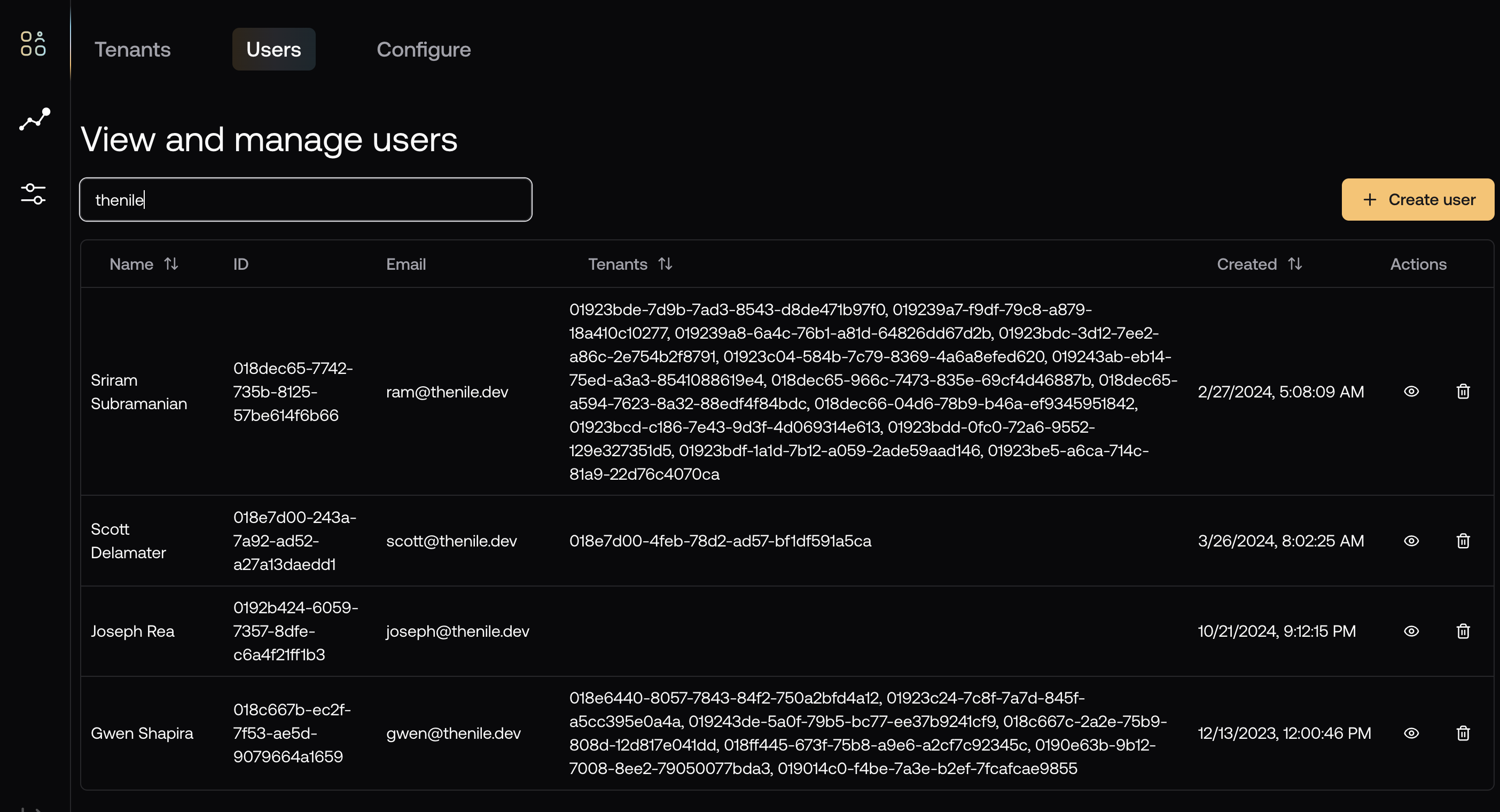
You can access the user management dashboard by navigating to the "Tenants and Users" page in the left sidebar of Nile Console and then selecting the "Users" tab.
Since the number of users is typically large, the dashboard has a search bar to help you find the users you need.
 ### User Details View
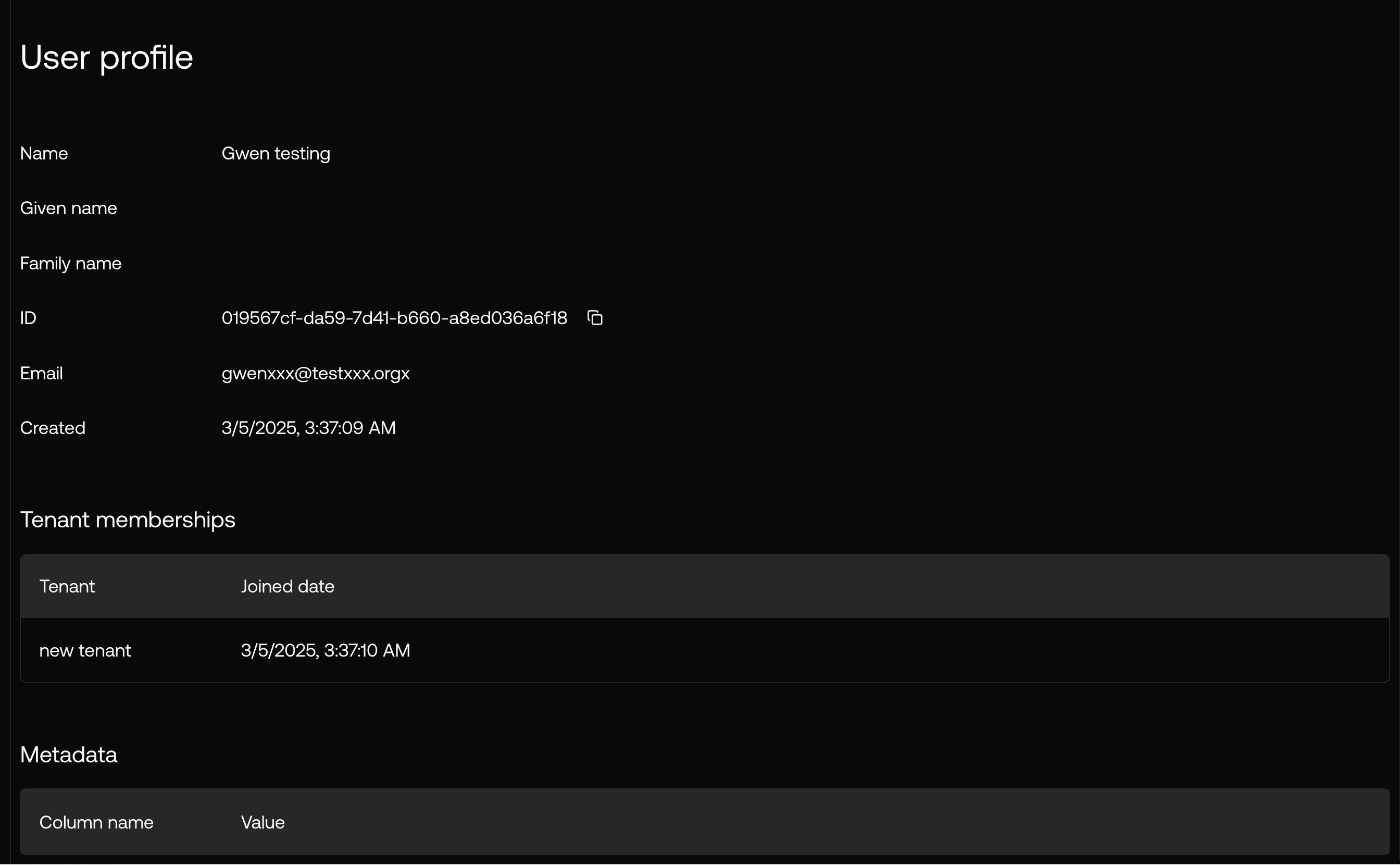
You can click on a user to view their details:
### User Details View
You can click on a user to view their details:
 ## User Management
### Creating Users
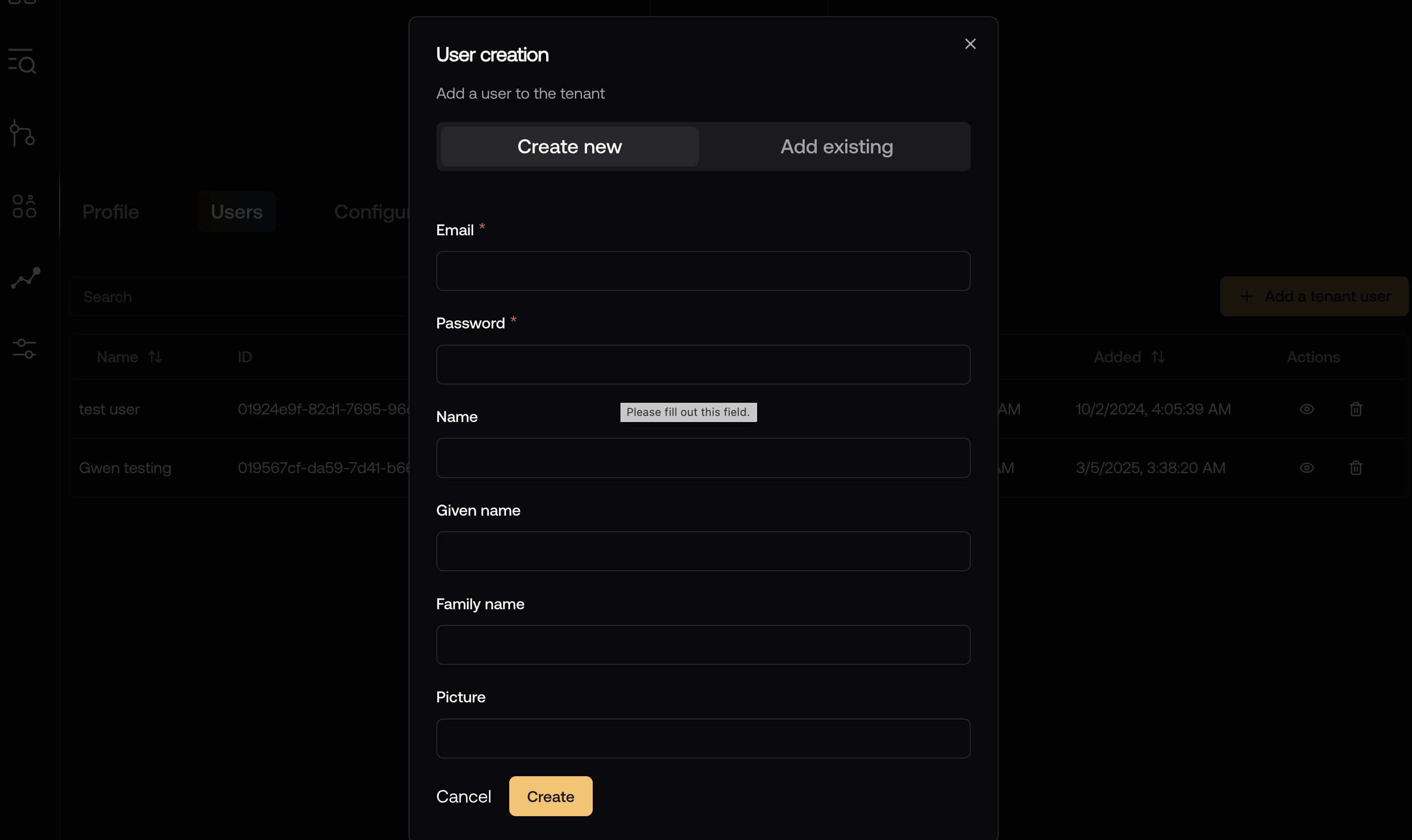
You can create a user by clicking on the "Create User" button in the top right corner of the dashboard.
Filling in the required fields and clicking on the "Create" button will create a new user.
## User Management
### Creating Users
You can create a user by clicking on the "Create User" button in the top right corner of the dashboard.
Filling in the required fields and clicking on the "Create" button will create a new user.
 Creating a user in this dashboard will not add them to any tenant (you can do
that later in the [tenants dashboard](/auth/dashboard/managing-tenants)) and
will not send them an email to verify their account.
### Editing Users
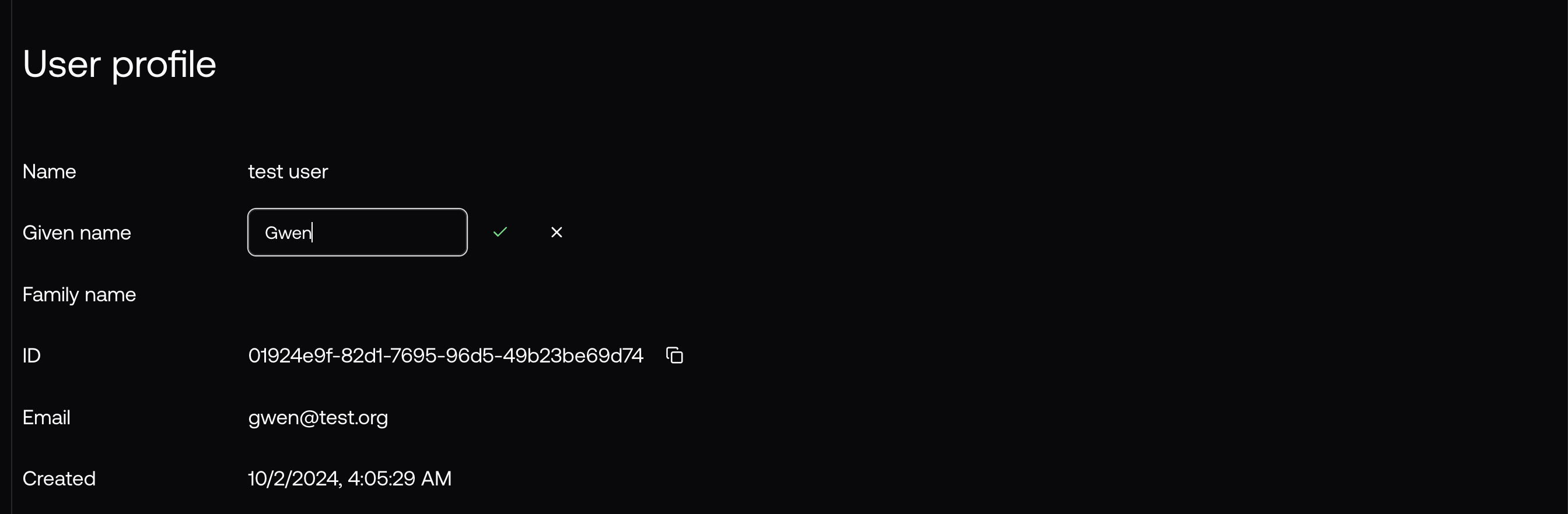
You can edit a user by clicking on the field you want to change and starting to type.
This works both in the top level list view and in the user details view.
Creating a user in this dashboard will not add them to any tenant (you can do
that later in the [tenants dashboard](/auth/dashboard/managing-tenants)) and
will not send them an email to verify their account.
### Editing Users
You can edit a user by clicking on the field you want to change and starting to type.
This works both in the top level list view and in the user details view.
 ### Deleting Users
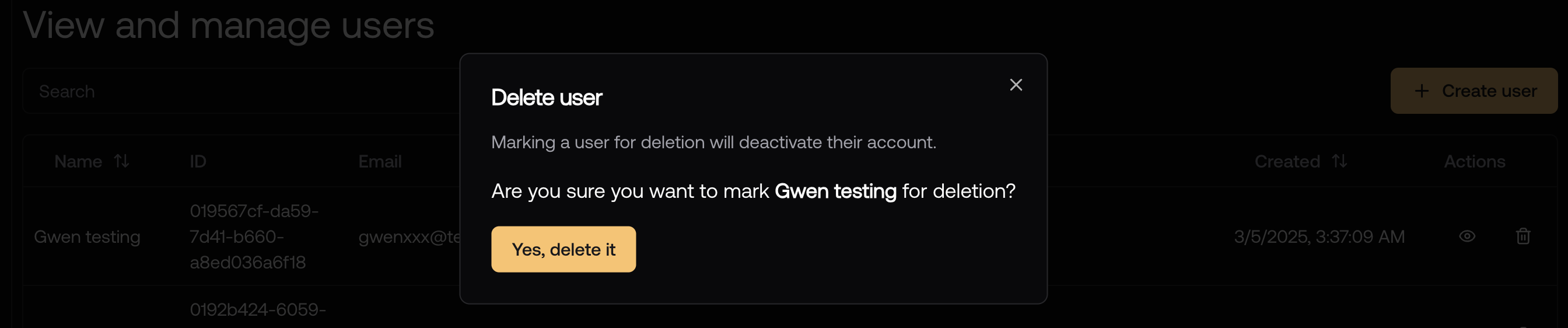
You can delete a user by clicking on the "Delete" button in the user list view.
### Deleting Users
You can delete a user by clicking on the "Delete" button in the user list view.
 ## User Properties
All user properties are stored in the `users.users` table. The dashboard, APIs
and SDK all use this table and therefore have access to the same properties.
```bash theme={null}
Table "users.users"
Column | Type | Collation | Nullable | Default
----------------+-----------------------------+-----------+----------+---------------------------
id | uuid | | not null | public.uuid_generate_v7()
created | timestamp without time zone | | not null | LOCALTIMESTAMP
updated | timestamp without time zone | | not null | LOCALTIMESTAMP
deleted | timestamp without time zone | | |
name | text | | |
family_name | text | | |
given_name | text | | |
email | text | | |
picture | text | | |
email_verified | timestamp without time zone | | |
Indexes:
"users_pkey" PRIMARY KEY, btree (id)
"users_email_key" UNIQUE, btree (email) WHERE deleted IS NULL
Referenced by:
TABLE "auth.credentials" CONSTRAINT "credentials_user_id_fkey" FOREIGN KEY (user_id) REFERENCES users(id)
TABLE "auth.oidc_auth_attempts" CONSTRAINT "oidc_auth_attempts_user_id_fkey" FOREIGN KEY (user_id) REFERENCES users(id)
TABLE "auth.sessions" CONSTRAINT "sessions_userId_fkey" FOREIGN KEY (user_id) REFERENCES users(id) ON DELETE CASCADE
```
This single source of truth makes it easier to manage user data, compared to auth systems that store user information in their own data stores.
The SDK uses the following interface to represent a user:
```typescript theme={null}
export interface User {
id: string;
email: string;
name?: string | null;
familyName?: string | null;
givenName?: string | null;
picture?: string | null;
created: string;
updated?: string;
emailVerified?: string | null;
tenants: { id: string }[];
}
```
## User Account Verification
It is common to want to verify a user's email address before allowing them to access your application.
This is especially important for email/password users since there is no other way to know if the email address is valid.
Nile Auth APIs and SDK support email verification with the `` component.
You can learn how to use it in the [Email Verification](/auth/email/verification) guide.
In addition, you may want to verify (or unverify) a user's email address manually.
You can do this by updating the `emailVerified` property in the `users.users` table.
This will mark the user as verified starting from the current time.
```sql theme={null}
UPDATE users.users SET email_verified = CURRENT_TIMESTAMP WHERE id = '';
```
To unverify a user, you can set the `emailVerified` property to `NULL`.
```sql theme={null}
UPDATE users.users SET email_verified = NULL WHERE id = '';
```
## Best Practices
* Always use meaningful names when creating users to make them easily identifiable in the dashboard
* Don't modify existing user properties without approval from the user or an administrator for their tenant.
* Regularly review user accounts and remove inactive or invalid ones to maintain security. Nile's users dashboard has a helpful "Last Login" column that can help you identify inactive users.
* Verify email addresses to ensure that they are valid and to prevent spam.
* Use the search functionality to quickly find users instead of scrolling through the list.
* Document any manual changes made to user accounts for audit purposes
## Related Topics
* [Managing Tenants](/auth/dashboard/managing-tenants)
* [Configurations](/auth/dashboard/configurations)
* [User Management Concepts](/auth/concepts/users)
## User Properties
All user properties are stored in the `users.users` table. The dashboard, APIs
and SDK all use this table and therefore have access to the same properties.
```bash theme={null}
Table "users.users"
Column | Type | Collation | Nullable | Default
----------------+-----------------------------+-----------+----------+---------------------------
id | uuid | | not null | public.uuid_generate_v7()
created | timestamp without time zone | | not null | LOCALTIMESTAMP
updated | timestamp without time zone | | not null | LOCALTIMESTAMP
deleted | timestamp without time zone | | |
name | text | | |
family_name | text | | |
given_name | text | | |
email | text | | |
picture | text | | |
email_verified | timestamp without time zone | | |
Indexes:
"users_pkey" PRIMARY KEY, btree (id)
"users_email_key" UNIQUE, btree (email) WHERE deleted IS NULL
Referenced by:
TABLE "auth.credentials" CONSTRAINT "credentials_user_id_fkey" FOREIGN KEY (user_id) REFERENCES users(id)
TABLE "auth.oidc_auth_attempts" CONSTRAINT "oidc_auth_attempts_user_id_fkey" FOREIGN KEY (user_id) REFERENCES users(id)
TABLE "auth.sessions" CONSTRAINT "sessions_userId_fkey" FOREIGN KEY (user_id) REFERENCES users(id) ON DELETE CASCADE
```
This single source of truth makes it easier to manage user data, compared to auth systems that store user information in their own data stores.
The SDK uses the following interface to represent a user:
```typescript theme={null}
export interface User {
id: string;
email: string;
name?: string | null;
familyName?: string | null;
givenName?: string | null;
picture?: string | null;
created: string;
updated?: string;
emailVerified?: string | null;
tenants: { id: string }[];
}
```
## User Account Verification
It is common to want to verify a user's email address before allowing them to access your application.
This is especially important for email/password users since there is no other way to know if the email address is valid.
Nile Auth APIs and SDK support email verification with the `` component.
You can learn how to use it in the [Email Verification](/auth/email/verification) guide.
In addition, you may want to verify (or unverify) a user's email address manually.
You can do this by updating the `emailVerified` property in the `users.users` table.
This will mark the user as verified starting from the current time.
```sql theme={null}
UPDATE users.users SET email_verified = CURRENT_TIMESTAMP WHERE id = '';
```
To unverify a user, you can set the `emailVerified` property to `NULL`.
```sql theme={null}
UPDATE users.users SET email_verified = NULL WHERE id = '';
```
## Best Practices
* Always use meaningful names when creating users to make them easily identifiable in the dashboard
* Don't modify existing user properties without approval from the user or an administrator for their tenant.
* Regularly review user accounts and remove inactive or invalid ones to maintain security. Nile's users dashboard has a helpful "Last Login" column that can help you identify inactive users.
* Verify email addresses to ensure that they are valid and to prevent spam.
* Use the search functionality to quickly find users instead of scrolling through the list.
* Document any manual changes made to user accounts for audit purposes
## Related Topics
* [Managing Tenants](/auth/dashboard/managing-tenants)
* [Configurations](/auth/dashboard/configurations)
* [User Management Concepts](/auth/concepts/users)